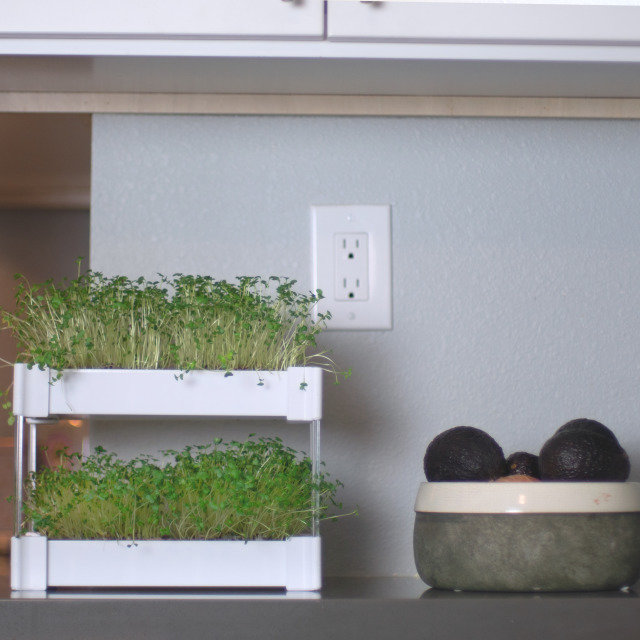
What is the advantage of the EcoQube Sprout?
It’s the first product that allows you to grow micro-veggies using a stackable hydroponic micro-garden.
Last updated: May 02, 2019 17:39
What is the size of the EcoQube Sprout?
4 in. wide x 11.25 in long x 1.60 in tall
Last updated: May 02, 2019 17:46
What's special about micro-veggies?
Micro-veggies have up to 40x the nutrients that their fully-grown counterparts( e.g. regular veggies) have, but are often expensive to purchase( costing up to $30-$50 per week to eat) and messy. With the Sprout, you can grow up to $20 worth of micro-veggies in 10 days for under $5 and keep your home clean!
Last updated: May 02, 2019 17:47
What kind of plants can I grow in it?
You can grow a variety of micro-veggies by adding different seeds to our “blank” seed-pads. We suggest micro-veggies such as broccoli, spinach, kale or arugula among other varietals.
Last updated: May 02, 2019 17:47
When will I receive it?
We are planning on shipping out the Sprout by June 2019 for later tiers. There is still a lot of design, production, and distribution work to be done, but we estimate that this is the most realistic date. We will, of course, update you with any new information that we have and let you know if you’ll receive our EcoQube Sprout earlier or later than expected.
Last updated: May 02, 2019 17:48
Do I need to water the plants in the EcoQube Sprout?
Simply add water into the water reservoir and our seed pads will take care of the rest.
Last updated: May 02, 2019 17:48
How do seed pad work?
The seed pad is made from molded pulp. The pulp acts as a grow medium for your seeds to root and grow from. It also acts as wick helping deliver the perfect amount of water from the water reservoir to your seeds.
Last updated: May 02, 2019 17:49
Does the EcoQube Sprout need soil to work?
No, the EcoQube Sprout grows micro-veggies without any soil! Simply add water into the water reservoir, and insert the seed pads with seeds inside.
Last updated: May 02, 2019 17:49
Will I need fertilizer for the EcoQube Sprout?
The EcoQube Sprout is able to grow micro-veggies without any soil or fertilizer. Simply add water into the water reservoir and insert the seed pads with seeds inside!
Last updated: May 02, 2019 17:49
How to set up?
Set in the desired location and add 600 ml of water. Insert seed pads, watch the micro-veggies grow, and harvest in 7 - 10 days!
Last updated: May 02, 2019 17:49
What's the tray made of?
Injection molded ABS plastic.
Last updated: May 02, 2019 17:50
What seeds can be grown?
Any micro-veggie seeds such as broccoli, arugula, kale, and spinach.
Last updated: May 02, 2019 17:50
How long will it take for the seeds sprout?
Seeds will sprout in 3-5 days and can be harvested when they’re 1-2 inches tall or after 7-10 days.
Last updated: May 02, 2019 17:50
How do you harvest the sprouts?
Use scissors or your fingers to trim the micro-veggies at the stem. See our video for EcoQube Frame for an example: https://www.youtube.com/watch?v=Km_z_b2XjR0
Last updated: May 02, 2019 17:50
Are the seed pads reusable?
The seed pads are not reusable, but are recyclable and can be composted after use!
Last updated: May 02, 2019 17:51
What type of water can be used?
We recommend using RO/distilled/filtered water. Tap water can work as well but can depend on local water quality.
Last updated: May 02, 2019 17:51
Can I grow other plants?
The EcoQube Sprout is only used for growing micro-veggies and not fully grown plants. You can grow the sprout versions of your favorite herbs! We like basil micro-veggies!
Last updated: May 02, 2019 17:52
Do I need sunlight?
The micro-veggies do not need sunlight to grow. However, sunlight can help them grow faster.
Last updated: May 02, 2019 17:52
For international customers, are the seeds included?
We cannot provide seeds to international customers. They will have to purchase their own micro-veggies seeds and use our DIY seed pad kit.
Last updated: May 02, 2019 17:52
What is BackerKit?
BackerKit is a service that crowdfunded project creators use to keep track of hundreds to tens of thousands of backers—from shipping details, pledge levels, preferences and quantities, whether they have paid or had their card declined, special notes, and everything in between!
The BackerKit software and support team is independent from the campaign’s project team—BackerKit does not handle the actual reward shipping. For more information about the preparation or delivery status of your rewards, please check the project's updates page.
How does BackerKit work?
After the campaign ends, the project creator will send you an email with a unique link to your survey. You can check out a walkthrough of the process here.
I never received my invitation. How do I complete the survey?
The most common reasons for not receiving a survey email is that you may be checking an email inbox different from the email address you used to sign up with Kickstarter, Indiegogo or Tilt Pro account, or it may be caught in your spam filter.
Confirm that the email address you are searching matches the email address tied to your Kickstarter, Indiegogo, or Tilt Pro account. If that doesn’t work, then try checking your spam, junk or promotions folders. You can also search for "backerkit” in your inbox.
To resend the survey to yourself, visit the project page and input the email address associated with your Kickstarter, Indiegogo or Tilt Pro account.
How do I update my shipping address?
BackerKit allows you to update your shipping address until the shipping addresses are locked by the project creator. To update your address, go back to your BackerKit survey by inputting your email here.
When will my order be shipped, charged or locked?
That is handled directly by the project creator. BackerKit functions independently of the project itself, so we do not have control of their physical shipping timeline. If you want to check on the project’s status, we recommend reading over the project's updates page.
I completed the survey, but haven't received my rewards yet. When will they arrive?
As BackerKit does not actually handle any rewards or shipping, the best way to stay updated on the shipping timeline would be to check out the project's updates page.